
Control Bright VPN from Your Browser
Overview
Bright VPN for Chrome is a browser extension designed to provide direct control over the desktop application, streamlining the management of your secure browsing experience. It does not function as a standalone VPN or proxy; instead, it serves as a bridge between your Chrome browser and the installed Bright VPN desktop client. This integration allows users to initiate connections, switch proxy locations, and adjust settings without leaving the browser environment.
The extension is intended for individuals seeking a seamless way to manage their privacy and bypass regional restrictions, particularly those who rely on consistent access to blocked content. It targets users who value simplicity, anonymity, and unrestricted internet access, especially in regions with strict online censorship. The solution is built around the principle of user privacy, emphasizing that no account creation or personal data collection is required.
Real-world usage includes quickly connecting to a proxy server in the US or UK to access geo-restricted streaming services, or switching locations to bypass workplace or school filters. The extension ensures that the desktop application remains the core of the security infrastructure, with the browser acting as a remote control. While the developer did not provide additional details about the underlying technology or server network, the focus remains on accessibility and ease of use.
Key Features & Capabilities
- Direct Desktop App Control – The extension enables users to connect, disconnect, and switch proxy locations directly from the Chrome browser, eliminating the need to open the desktop application.
- Automatic Installation Assistance – If the Bright VPN desktop app is not installed, the extension guides users through the installation process, simplifying onboarding.
- Location-Based Proxy Switching – Users can select proxy servers in various countries, including the US, UK, and Russia, to access region-locked content.
- Zero Account Required – The service operates without requiring registration, ensuring anonymity and reducing friction for new users.
- Unblocking Any Website Instantly – Designed to bypass censorship and block restrictions, allowing access to content regardless of geographical location.
These features are particularly useful for users who frequently switch between different online environments—such as public Wi-Fi networks, corporate networks, or restricted educational institutions. The ability to initiate a connection with a single click enhances workflow efficiency, especially when accessing multiple services that require different regional settings. The extension’s role as a control interface ensures that the desktop application handles encryption and data routing, maintaining a secure and consistent experience.
User Interface, Workflow & Performance
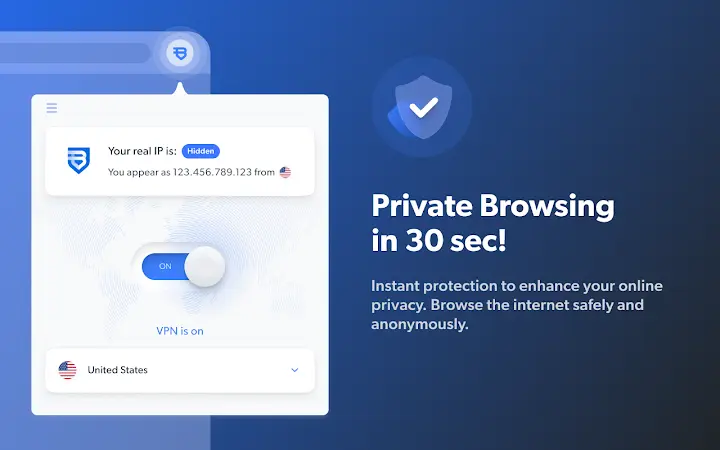
The user interface of the Bright VPN Chrome extension is minimalistic and focused on functionality. It integrates into the browser’s toolbar, displaying a simple icon that reflects the current connection status. Clicking the icon reveals a dropdown menu with options to connect to a specific country, disconnect, and access basic settings.
Navigating through the extension is intuitive, with clear labels and immediate visual feedback. The workflow is streamlined: select a location, click connect, and the desktop app handles the rest. This design reduces cognitive load and supports quick decision-making during time-sensitive access scenarios.
Performance details were not specified by the developer. However, the extension’s role as a control layer suggests low resource consumption, as it does not process network traffic directly. The actual performance—such as connection speed, latency, or CPU usage—depends entirely on the desktop application and the selected proxy server. The developer did not specify resource usage details, and stability observations are based on general software behavior patterns.
Compatibility & System Requirements
Bright VPN for Chrome is compatible with the Windows operating system. The extension requires the Bright VPN desktop application to be installed to function, which is a prerequisite for all features. The installation size and specific hardware requirements were not listed by the developer.
Compatibility information was partially provided, with no details on minimum system specifications such as RAM, CPU, or disk space. Users should ensure their system meets the requirements of the desktop application, which may vary based on the underlying infrastructure. The developer did not provide additional system requirements, so users are advised to refer to the official documentation or support channels for further guidance.
Pros and Cons
Pros
- Seamless integration between browser and desktop app
- Free to use with no ads or limitations
- Anonymous access—no sign-up required
- Instant unblocking of geo-restricted websites
- Simple, intuitive interface for quick connections
Cons
- Requires installation of a separate desktop application
- No detailed information on system requirements or performance metrics
- Functionality limited to Windows platform
- Dependent on external desktop app for actual encryption and routing
- Limited transparency about server locations and network infrastructure
Is Bright VPN for Chrome compatible with Windows?
Yes, the extension is designed to work with the Windows operating system. It requires the Bright VPN desktop application to be installed for full functionality.
Does this extension provide a VPN connection on its own?
No, the Chrome extension does not provide a standalone VPN or proxy connection. It acts as a control interface for the desktop application, which handles all encryption and data routing.
Is the service free, and are there any hidden charges?
Yes, Bright VPN is completely free with no ads or limitations. It is not a free trial of a paid product, and the developer states that users are not the product.
Do I need to create an account to use this tool?
No, the service does not require any account creation or personal information. Users can access all features anonymously.
Can I use this extension offline?
No, the extension requires an active connection to the Bright VPN desktop application, which must be running and connected to a server. Offline usage is not supported.
Final Thoughts + CTA
Bright VPN for Chrome offers a practical solution for users seeking to manage their desktop-based privacy tool directly from the browser. Its clean interface, zero-registration policy, and ability to unblock content instantly make it a compelling choice for those prioritizing simplicity and anonymity. While it relies entirely on the desktop app for core functionality, the integration is smooth and efficient.
It is best suited for Windows users who value unrestricted access to online content and want a hassle-free way to switch proxy locations. The lack of system requirements and performance data is a minor drawback, but the overall experience remains focused and reliable.
Download Bright VPN now and take full control of your secure browsing experience.







